---
title: Reconnecting Your Vrtly Stick to Wi-Fi
description: Troubleshoot Vrtly screen issues like outdated content, a spinning wheel, or a Wi-Fi disconnect icon on your vrtStick. Follow these steps to get your screen working properly again.
---
[Skip to content](https://support.vrtly.ai/kb/reconnecting-your-vrtly-stick-to-wifi#main-content)
[](https://support.vrtly.ai?hsLang=en)
- [Plans](https://www.vrtly.ai/pricing)
Open main navigation
Close main navigation
- [Plans](https://www.vrtly.ai/pricing)
- [Contact us](https://support.vrtly.ai/kb/contact-support)
[Contact us](https://support.vrtly.ai/kb/contact-support?hsLang=en)
How can we help?
- There are no suggestions because the search field is empty.
1. [Support](https://support.vrtly.ai/kb?hsLang=en)
2. [Troubleshooting](https://support.vrtly.ai/kb/troubleshooting?hsLang=en)
3. [Legacy Hardware](https://support.vrtly.ai/kb/troubleshooting?hsLang=en#legacy-hardware)
# Reconnecting Your Vrtly Stick to Wi-Fi
## If your screen is showing outdated content, a spinning wheel, or a Wi-Fi disconnect icon, these steps can help resolve the issue.
To reconnect your vrtStick to Wi-Fi:
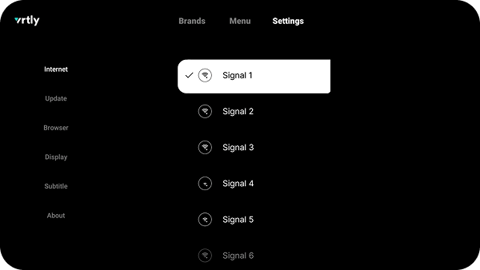
1. Grab your vrtStick remote and click the **Menu** button.
2. Go to **Settings** \> **Internet** \> select the correct Wi-Fi network.
3. Enter your Wi-Fi password and press **Connect**.
Once you see a checkmark next to your Wi-Fi network, you will know you have successfully connected back to your Wi-Fi.
### Still have questions?
Reach out to our team at [**support@vrtly.ai**](mailto:support@vrtly.ai?body=Full%20Name%3A%20%0APhone%20Number%3A%20%0ABusiness%20Name%3A%20%0A%0A%E2%80%94%E2%80%94%E2%80%94%0A%0ASummary%20of%20issue%20(please%20be%20as%20descriptive%20as%20possible)%3A%20%0A)
- [Get Started](https://support.vrtly.ai/kb/get-started?hsLang=en#main-content)
- [Screen Setup](https://support.vrtly.ai/kb/get-started?hsLang=en#screen-setup)
- [Best Practices](https://support.vrtly.ai/kb/best-practices?hsLang=en)
- [Content Management](https://support.vrtly.ai/kb/content-management?hsLang=en)
- [Strategies](https://support.vrtly.ai/kb/strategies?hsLang=en)
- [Account & Billing](https://support.vrtly.ai/kb/account-billing?hsLang=en)
- [Troubleshooting](https://support.vrtly.ai/kb/troubleshooting?hsLang=en#main-content)
- [Preventing Screens from Turning Off](https://support.vrtly.ai/kb/troubleshooting?hsLang=en#preventing-screens-from-turning-off)
- [Legacy Hardware](https://support.vrtly.ai/kb/troubleshooting?hsLang=en#legacy-hardware)
- [Plans](https://www.vrtly.ai/pricing)
[](https://vrtly.ai/support)
15 Railroad Avenue
Danville, CA 94526
[mailto:support@vrtly.ai](mailto:support@vrtly.ai)
Copyright © Vrtly, Inc.